


Cart
- Cart Empty!
- Appliances
- Software Esd
- Telephony/ Handhelds
- Audio/ Video/ Multimedia
- Books
- Cables & Accessories
- Communication & Networking
- Controller & Interface
- Imaging & Photography
- Input Devices
- Monitor & Display
- Motherboard/ Memory/ Processor
- Notebook/ Tablet Pc/ E-book
- Pc & Workstation
- Power Components & Protection
- Printer/ Aio/ Copier/ Fax
- Projectors
- Servers
- Software
- Storage
Every effort has been made to ensure the accuracy of all information contained herein. e-nitiative shall not be liable for any changes resulting in wrong product description, tax code and/or price. The shown information (specifications, prices, taxes) should be considered as an indication and can be changed at any moment and without any prior notice.

Company details
Nieuwenhuijs ICT bv
DBA: LASKA COMPUTERS
Deltazijde 10b
1261ZM BLARICUM
The Netherlands
Email Us
info@laska.nl
Phone
035-5243553
VAT No
NL865672143B01
KVK No
91497434



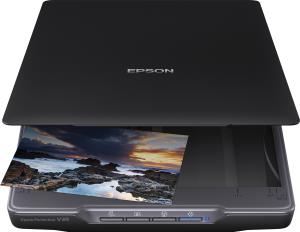
Product Details
Introduction
Ultra-compact and tidy
The V39's power and connectivity is handled via a single Micro USB to reduce cable clutter and keep your workspace tidy. The device also has a built-in stand for flexible scanning to suit your desk space.
Fast, high-quality results
Thanks to Epson's ReadyScan LED Technology, you can start scanning instantly - no warm-up time is required. Make sure that even your old photos look their best with Epson Easy Photo Fix software, which improves the quality of your scans by removing dust, restoring faded colours and correcting backlight. Even your scanned documents will look great as the V39 comes with a range of enhancement features, enabling you to improve text sharpness and remove unwanted 'bleed-through' from double-sided documents.
Convenient
To make scanning quick and easy, the V39 has four one-touch buttons so you can scan, copy, share and turn your photos and documents into multi-page searchable PDFs at the push of a button. For added versatility, a fully-detachable lid makes scanning of thick books, photo albums and other bound items possible. Scan directly to cloud storage services such as SugarSync and Evernote and easily share your photos with family and friends by scanning straight to Facebook and Picasa.
Performance
Scanning noise level
43 dB
Sensor type
CIS
Light source
White LED
Scan file formats
BMP, JPEG, PDF, TIFF
Button functions
Copy, On, Scan to PDF
Scan drivers
ICA, TWAIN
Scanning
Maximum scan size
216 x 297 mm
Optical scanning resolution
4800 x 4800 DPI
Colour scanning
Y
Duplex scanning
N
Input colour depth
48 bit
Output colour depth
24 bit
Movement resolution
4800 DPI
Design
Scanner type
Flatbed scanner
Product colour
Black
Control type
Buttons
Built-in display
N
Paper handling
Maximum ISO A-series paper size
A4
ISO A-series sizes (A0...A9)
A4
Letter
Y
Legal
Y
Ports & interfaces
USB port
Y
USB version
2.0
Power
Power supply type
USB
Power consumption (typical)
2.5 W
Power consumption (off)
0.013 W
Packaging data
Package width
90 mm
Package depth
440 mm
Package height
310 mm
Package weight
1.88 kg
Quantity per pack
1 pc(s)
Packaging content
Bundled software
Epson Copy Utility, Epson Document Capture (Mac only), Epson Document Capture Pro (Windows only), Epson Easy Photo Scan, Epson ScanSmart
Cables included
USB
Features
Country of origin
Indonesia
System requirements
Windows operating systems supported
Windows 10, Windows 7, Windows 8, Windows 8.1, Windows Vista, Windows XP
Mac operating systems supported
Mac OS X 10.6 Snow Leopard, Mac OS X 10.7 Lion, Mac OS X 10.7.5 Lion, Mac OS X 10.8 Mountain Lion, Mac OS X 10.9 Mavericks
Compatible operating systems
Mac OS 10.7.x, Mac OS 10.8.x, Mac OS 10.9.x, Mac OS X 10.6.8, Windows 10, Windows 11 or later, Windows 7, Windows 8, Windows 8.1, Windows Vista, Windows XP SP2 or higher
Operational conditions
Operating temperature (T-T)
10 - 35 °C
Storage temperature (T-T)
-20 - 60 °C
Operating relative humidity (H-H)
20 - 80%
Storage relative humidity (H-H)
20 - 80%
Weight & dimensions
Width
249 mm
Depth
364 mm
Height
39 mm
Weight
1.5 kg
Other features
Image formats supported
BMP, JPEG, TIFF, MTIFF
Printer features
RGB colour dropout, Automatic area segmentation, Text enhancement, Scan to Selected Photo Sharing Websites, 4 push buttons (PDF, Send, Copy, Start), Integrated stand for upright scanning
Scanner features
RGB colour dropout, Automatic area segmentation, Text enhancement, Scan to Selected Photo Sharing Websites, 4 push buttons (PDF, Send, Copy, Start), Integrated stand for upright scanning
Box contents
Main unit, Setup guide, USB cable, Warranty document
Interface
USB 2.0 Micro-AB
Logistics data
Products per pallet
126 pc(s)
Pallet gross length
120 cm
Pallet gross width
80 cm
Pallet gross height
2.01 m
Products per pallet layer
21 pc(s)
Products per pallet layer (UK)
28 pc(s)
Products per pallet (UK)
168 pc(s)
Pallet length (UK)
120 cm
Pallet height (UK)
2.01 m


